How to Unlock a High School Locker: Easy Step-by-Step Guide
Ever found yourself in a pickle, staring at your high school locker, unable to access your books and belongings because you've forgotten the combination? You're not alone. High school lockers are a staple of student life, but they can also be a source of frustration when you can't unlock them. Fear not, for we've compiled a comprehensive guide to help you unlock your high school locker with ease. Let's dive in!
Before we delve into the various methods to unlock your locker, it's crucial to understand the types of locks you might encounter. High school lockers typically use one of three lock types: combination locks, key locks, and digital locks. Each type has its unique unlocking mechanism, which we'll explore in detail.
Understanding Your Locker Lock
As mentioned earlier, high school lockers primarily use three types of locks. Familiarizing yourself with these lock types will help you determine the best approach to unlocking your locker.


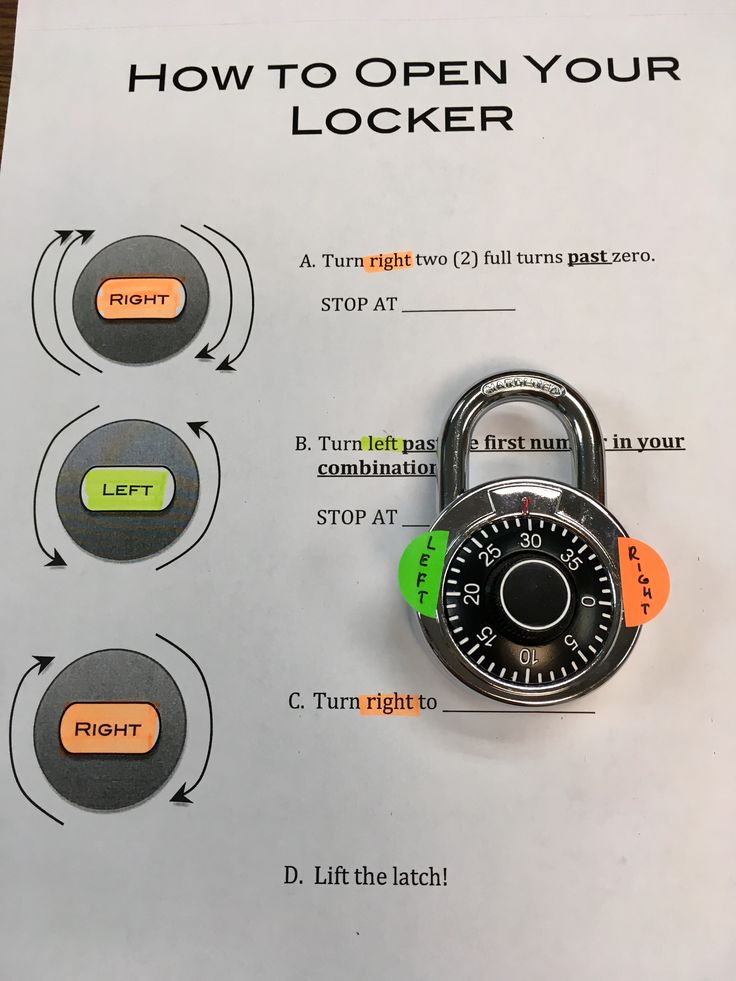
1. Combination Locks: These are the most common types of locks found on high school lockers. They consist of a dial that you spin to enter a specific combination of numbers. Once you've entered the correct combination, the lock will open.
Combination Locks: Dialing In the Correct Sequence
To unlock a combination lock, follow these steps:


- Locate the combination written on a piece of paper taped to your locker or stored in a secure place. If you've memorized the combination, skip to step 3.
- Enter the first number of the combination on the dial, then pull up on the shackle (the metal part that sticks out). If you hear a click, proceed to the next number. If not, you've entered the wrong number. Try again.
- Repeat the process for the second and third numbers in the combination. Once you've entered the correct sequence, the lock should open, and you can pull the shackle out.
Combination Locks: Resetting a Forgotten Combination
If you've forgotten your combination lock's sequence, don't panic. You can reset it by following these steps:
- Turn the dial to the right three times, passing each number once.
- Stop on any number and pull up on the shackle. If it opens, you've successfully reset the lock. If not, proceed to the next step.
- Turn the dial to the left three times, passing each number once.
- Stop on any number and pull up on the shackle. If it opens, you've reset the lock. If not, repeat the process until you find the correct number.
Dealing with Other Types of Locker Locks
While combination locks are the most common, you might encounter other lock types in your high school. Let's explore how to unlock key locks and digital locks.
1. Key Locks: These locks use a physical key to unlock the locker. If you've lost your key, you'll need to contact your school's maintenance or facilities department to have the lock replaced or the door drilled open. In most cases, you'll need to provide proof of identity and ownership of the locker before they can assist you.


Key Locks: Using a Spare Key
If you have a spare key for your locker, unlocking it is straightforward:
- Insert the key into the keyhole and turn it to the right until you feel it stop. This should unlock the locker.
- Pull the shackle out to open the locker door.
2. Digital Locks: These locks use an electronic keypad to enter a combination. They typically require a 4-digit PIN to unlock. If you've forgotten your PIN, you'll need to contact your school's administration or maintenance department for assistance, as resetting these locks usually requires special tools.
Digital Locks: Entering the Correct PIN
To unlock a digital lock, follow these steps:


- Locate the combination written on a piece of paper taped to your locker or stored in a secure place. If you've memorized the combination, skip to step 3.
- Enter the first digit of the combination on the keypad, then press the "#" or "Enter" key. If you hear a beep or see a light indicating that the entry was accepted, proceed to the next digit. If not, you've entered the wrong number. Try again.
- Repeat the process for the remaining digits in the combination. Once you've entered the correct sequence, the lock should unlock, and you can open the locker door.
Now that you've learned how to unlock various types of high school locker locks, you're well-equipped to tackle any locker-related challenges that come your way. Keep this guide handy, and you'll never be locked out of your belongings again. Happy unlocking!
Related Articles
School Locker Lock Instructions: Step-by-Step Guide
Learning how to use a school locker lock correctly can save you time and stress during a busy day. These sturdy metal storage units line the hallways of most...

Find School Locker Locations Brisbane Fast Easy Guide
Finding the perfect school locker location in Brisbane can make a significant difference to your daily school routine. Not only does it help you stay...

Maximize Space: The Ultimate High School Locker Storage Guide
High school locker storage is often the unsung hero of the daily school routine, quietly managing the chaos of textbooks, coats, and personal items for...

Easy DIY Clock for School Project: Step-by-Step Guide
Creating a clock for school project is an excellent way to combine creativity with basic engineering principles, turning a simple assignment into a memorable...
Easy DIY Wall Clock for School Project: Step-by-Step Guide
Creating a wall clock for a school project can be an engaging and educational experience. It allows you to explore various concepts in physics, mathematics...

How to Cut a Short Haircut Female: Easy Step-by-Step Guide
Embracing a short haircut can be a liberating and empowering decision for women, offering low-maintenance style and a chance to showcase their features. But...