How to Unlock a School Locker: Easy Step by Step Guide
Ever found yourself in a pickle, standing in front of your school locker, books in hand, but unable to access your belongings because you've forgotten the combination? Don't panic! We've all been there. Unlocking a school locker is a common challenge, but with the right steps, it's a breeze. Let's dive into a step-by-step guide on how to unlock your school locker.
First, let's understand the types of school lockers you might encounter. Most schools use one of three types: combination locks, key locks, or digital locks. Each has its own unlocking method, which we'll explore in detail. So, grab a pen and paper, and let's get started!
Unlocking Combination Locks
Combination locks are the most common type of school locker lock. They use a sequence of numbers to open. If you've forgotten your combination, don't worry. There are ways to figure it out.


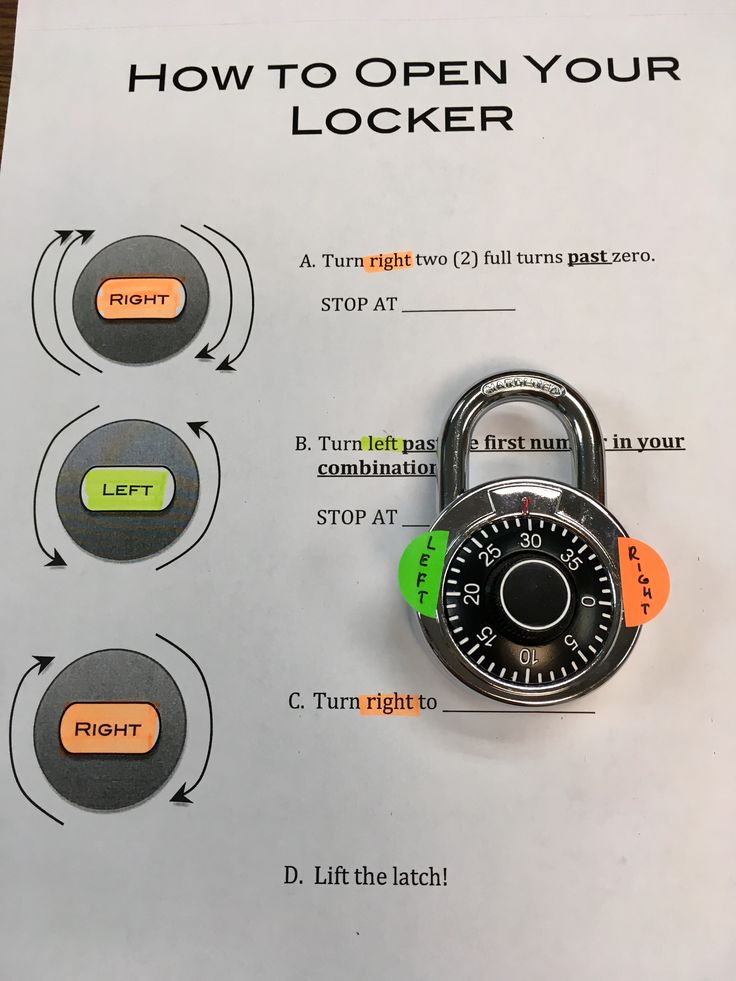
First, try to remember any patterns or significant numbers you might have used when setting the combination. Many people use birthdays, anniversaries, or other memorable dates. If that doesn't work, we can try a few tricks to find the combination.
Using the Trial and Error Method
The trial and error method involves trying different combinations until you find the right one. It's simple but can be time-consuming. Start with the most common combinations, like 000, 123, or 999. If those don't work, try other simple sequences like 012, 123, or 987.


If you're still having no luck, try using a combination of significant numbers. For example, if your birthday is January 15, you might try 015, 150, or 510. Remember, the order matters, so try different sequences.
Using the Lock Picking Method
If you're feeling adventurous and have some time to spare, you can try picking the lock. This method involves using a tool to manipulate the lock's internal components. It's a bit more complex but can be effective if done correctly.
You'll need a few tools, like a tension wrench and a pick. Insert the tension wrench into the bottom of the lock and apply slight pressure. Then, insert the pick and feel for the pins. Once you've found them, apply light pressure and turn the wrench. It might take a few tries, but with patience, you should be able to unlock the locker.


Unlocking Key Locks
Key locks are another common type of school locker lock. They use a physical key to open. If you've lost your key, don't despair. There are still ways to unlock your locker.
First, check with your school's administration. They might have a spare key or a master key that can open all the lockers. If that doesn't work, you can try picking the lock or drilling it open. However, these methods should be used as a last resort and only with permission from your school.
Using the Lock Picking Method
Just like with combination locks, you can try picking a key lock. The process is similar, but you'll need a different set of tools. Insert the tension wrench into the bottom of the lock and apply slight pressure. Then, insert the pick and feel for the pins. Once you've found them, apply light pressure and turn the wrench.


Remember, picking a lock takes practice. It's not something you can master overnight. If you're not confident in your abilities, it's best to leave it to a professional.
Drilling the Lock
Drilling a lock is a last resort method that should only be used with permission from your school. It involves drilling a hole into the lock to access the internal components. Once you've drilled the hole, you can use a tool to manipulate the lock's internal components and unlock it.
This method is destructive and should only be used if all other methods have failed. It's also important to note that drilling a lock can damage the locker, so it's best to have a plan for replacing it.
Unlocking Digital Locks
Digital locks are the newest type of school locker lock. They use a keypad to enter a code. If you've forgotten your code, you can try a few tricks to unlock it.
First, try to remember any patterns or significant numbers you might have used when setting the code. If that doesn't work, you can try using the factory reset code. Most digital locks have a default code that can be used to reset the lock. Check the lock's manual or contact the manufacturer for the specific code.
Using the Factory Reset Code
To use the factory reset code, you'll need to enter a specific sequence of numbers. This will reset the lock to its default settings and allow you to set a new code. The sequence varies depending on the lock, so it's important to check the manual or contact the manufacturer for the specific code.
Once you've entered the code, the lock should beep or flash to indicate that it's been reset. You can then set a new code and unlock your locker.
Remember, unlocking a school locker can be a challenge, but with the right methods and a bit of patience, you can get back into your locker in no time. If you're still having trouble, don't hesitate to ask for help from your school's administration or a trusted adult. And next time, make sure to write down your combination or code and keep it in a safe place!
Related Articles

Find School Locker Locations Brisbane Fast Easy Guide
Finding the perfect school locker location in Brisbane can make a significant difference to your daily school routine. Not only does it help you stay...

Easy Painted Rock Ideas: Step-by-Step Guide
Painted rock ideas easy step by step projects are a fantastic way to bring a burst of color and personality into your outdoor space without needing advanced...

Easy Origami Bookmark Instructions Printable Step by Step Guide
Origami, the ancient Japanese art of paper folding, has captivated people of all ages for centuries. One of the most practical and delightful ways to...

How to Install Laminate on Stairs Step by Step for Beginners: Easy Guide
Embarking on a DIY project to install laminate flooring on your stairs can significantly enhance your home's aesthetics and functionality. This step-by-step...
School Locker Lock Instructions: Step-by-Step Guide
Learning how to use a school locker lock correctly can save you time and stress during a busy day. These sturdy metal storage units line the hallways of most...

Easy Paper Mosaic Ideas Creative Step By Step Guide
Easy paper mosaic ideas offer a welcoming gateway into the world of tactile art, allowing you to transform simple sheets of paper into vibrant, textured...