Easy Locker Lock Instructions Step by Step Guide
Ever found yourself locked out of your school locker, office cabinet, or gym storage, frantically searching for those elusive locker lock instructions? You're not alone. Locker locks, while providing essential security, can sometimes pose a challenge when it comes to remembering their operation. Fear not, as this comprehensive guide will walk you through the intricacies of various locker lock types, ensuring you're never left out in the cold again.
Before we dive into the specifics, let's briefly discuss the different types of locker locks you might encounter. The most common are combination locks, padlocks, and digital locks. Each has its unique features and operation methods. Now, let's explore each type in detail.
Combination Locks
Combination locks are classic and widely used in schools, gyms, and offices. They operate using a sequence of numbers, letters, or a combination of both. Here's how to navigate these locks:
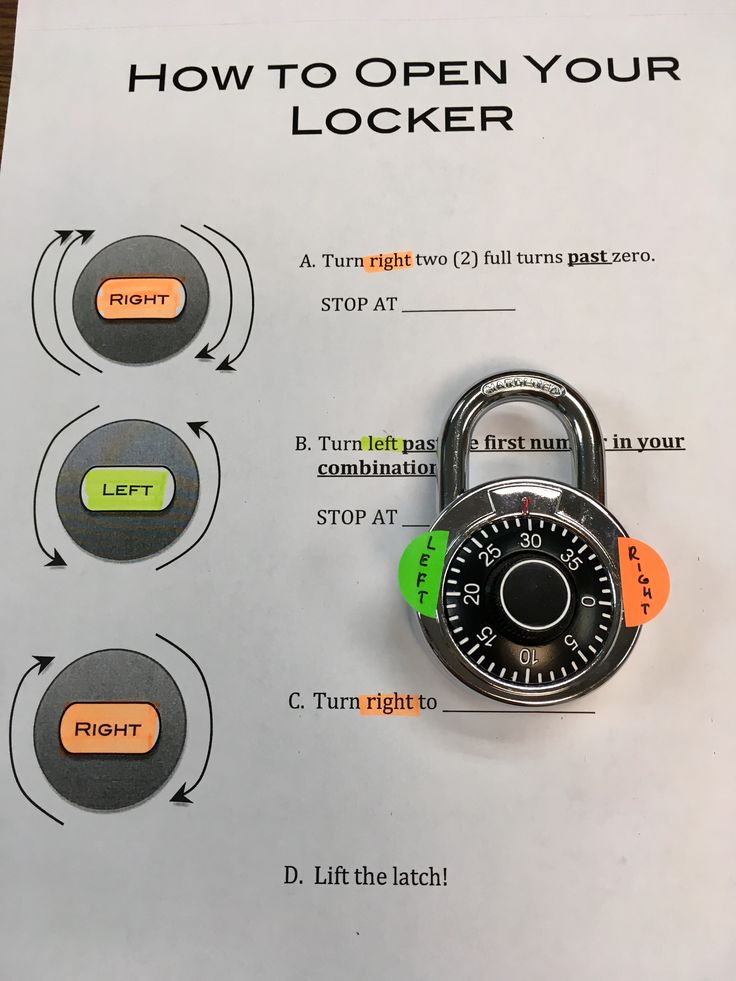


Setting the Combination
To set your combination, follow these steps:
- Turn the dial to the right until it stops.
- Turn the dial to the left and align the first number of your combination with the arrow or indicator.
- Turn the dial to the right and align the second number.
- Turn the dial to the left and align the third number.
- Turn the dial to the right until the locker opens.
Resetting the Combination
If you need to reset your combination, follow these steps:


- Turn the dial to the right until it stops.
- Turn the dial to the left and align any number with the arrow or indicator.
- Turn the dial to the right and align a different number.
- Turn the dial to the left and align a third number.
- Turn the dial to the right until the locker opens. Now you can set your new combination.
Padlocks
Padlocks are simple yet effective, requiring a key to unlock. Here's how to handle them:
Locking and Unlocking
To lock your padlock:
- Insert the key into the keyhole and turn it to the right until it stops.
- Remove the key.
To unlock your padlock:


- Insert the key into the keyhole and turn it to the left until it stops.
- Remove the key and open the locker.
Removing the Lock Core
If you've lost your key, you might need to remove the lock core. Here's how:
- Insert the key and turn it to the left until it stops.
- Use a small screwdriver to press the set screw located on the bottom of the lock.
- Turn the key to the right until the lock core pops out.
Digital Locks
Digital locks offer keyless convenience and are increasingly popular in schools and offices. Here's how to operate them:
Setting the Code
To set your code, follow these steps:


- Press and hold the 'Program' or 'Set' button until the lock beeps.
- Enter your new code using the number buttons.
- Press the 'Enter' or '#' button to save your code.
Locking and Unlocking
To lock your digital lock:
- Close the locker door and press the 'Lock' button.
To unlock your digital lock:
- Enter your code using the number buttons.
- Press the 'Enter' or '#' button.
Remember, digital locks often have an automatic lock feature. Ensure you're familiar with your lock's specific settings to avoid getting locked out.
Now that you're equipped with these locker lock instructions, you'll never be left in the lurch again. Happy unlocking!
Related Articles

School Locker Lock How To Open Easy Step By Step Guide
Ever found yourself standing in front of your school locker, staring at the lock, and drawing a blank on how to open it? You're not alone. School locker locks...
How to Use an Old School Locker Lock: Easy Step by Step Guide
Ever found yourself in a nostalgic daze, reminiscing about the good old days when school lockers were the ultimate symbol of personal space? If you're here...

Easy Origami Bookmark Instructions Printable Step by Step Guide
Origami, the ancient Japanese art of paper folding, has captivated people of all ages for centuries. One of the most practical and delightful ways to...
School Locker Lock Instructions: Step-by-Step Guide
Learning how to use a school locker lock correctly can save you time and stress during a busy day. These sturdy metal storage units line the hallways of most...

Seth Thomas Wall Clock Instructions Easy Step By Step Guide
Finding clear and reliable Seth Thomas wall clock instructions can turn a confusing repair into a smooth restoration project. These timeless timepieces carry a...

Ikea Futon Bed Instructions Easy Step By Step Guide
Transform your living space into a cozy, multifunctional haven with IKEA's versatile futon bed. This space-saving, dual-purpose furniture piece serves as both...