School Picture Description Ideas Capturing Memories in a Flash
Every year, parents search for the right school picture description to capture a clear and meaningful memory of their child. A single photograph preserves a specific moment in time, freezing a stage of growth that families can revisit for years to come.
Beyond just a file name, a thoughtful description adds context, emotion, and detail that standard folders and galleries often miss. Using precise language helps you locate the image later and share the story with relatives, teachers, and even future generations.
Organizing Photos by Academic Year
Structuring images by school year provides a logical timeline that is easy to follow and reference. This approach helps maintain clarity when you have multiple children or when picture day events happen across different terms.


Creating folders labeled with the academic year, grade level, and school name ensures that every description starts with a solid organizational foundation. Consistent naming prevents confusion when comparing milestones such as kindergarten entry, first communion, or graduation.
Using Clear Date Formats
Including the exact date in the file name, written in a standard format, removes ambiguity about when the picture was taken. Formats like YYYY-MM-DD sort chronologically and work well for both digital albums and printed records.


For example, adding Summer2025 or 2025-09-15 helps differentiate between similar events, such as orientation pictures and formal portrait sessions. This habit saves time when searching for a specific memory years later.
Adding Child Initials or Full Names
Adding the child’s initials or full name directly in the file name keeps individual students easy to identify, especially in group or class photos. This practice is especially helpful for larger families or schools with several students per grade.
Combining the name with the year, such as EmmaW_Year3_2025, ensures that each child’s images remain distinct while staying aligned with the overall timeline. It also supports privacy control when sharing albums online or via cloud storage.


Describing the Picture Content
Describing what is happening in the photo adds emotional depth and clarity beyond basic dates and names. Details like clothing, location, and expression help bring the memory back to life when viewing the image later.
A thoughtful caption or file name can highlight special elements such as a class project, a favorite accessory, or a unique background, turning an ordinary school snapshot into a vivid keepsake.
Mentioning Uniforms or Outfits
Noting the color of the uniform, sweater, or tie in the description provides visual context that ages well and supports recognition over time. Including terms like winter coat, sports jersey, or class T-shirt can highlight participation in specific activities.


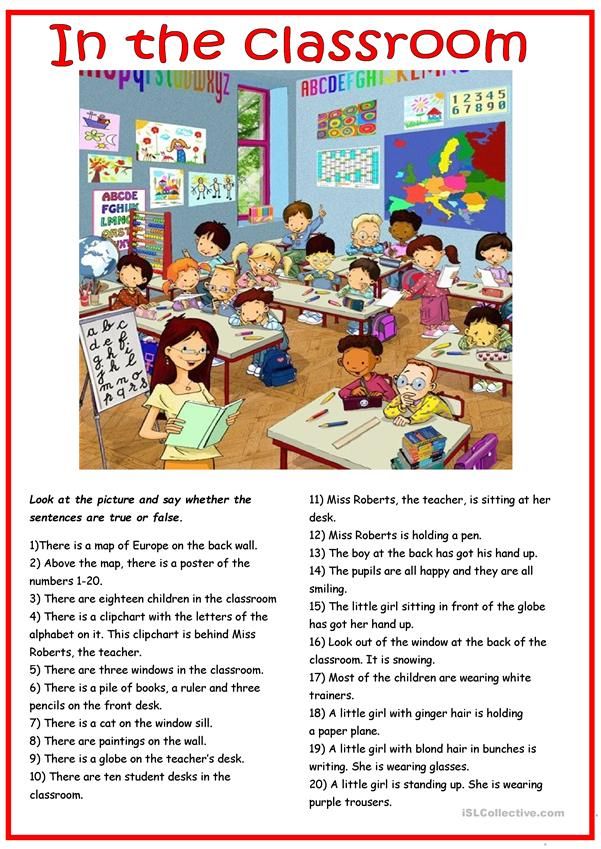


This approach is especially useful for athletic days, science fairs, or cultural events where the clothing becomes part of the story. It also helps when sorting images by season or extracurricular involvement.
Highlighting Special Events or Props
When a photo captures a project, certificate, or ceremonial item, naming that object in the description adds educational and historical value. Mentioning a science experiment, artwork, or graduation cap immediately signals the significance of the moment.
Parents and students can later revisit these images to recall achievements, friendships, and classroom experiences, using props as visual anchors for memory. Detailed descriptions make digital archives more meaningful and engaging.
Considering Privacy and Sharing Settings
How you describe and store school pictures affects who can view them and how long they remain accessible. Clear descriptions help manage permissions by indicating whether an image is for family only, classroom use, or public sharing.
Being intentional with wording, such as including or excluding names, ensures that sensitive information stays protected while still allowing relatives and teachers to enjoy the memories.
Using Restricted Folder Labels
Adding tags like FamilyOnly or Private to file names and folder titles signals which images should not be shared beyond close circles. This simple practice supports responsible digital habits in an increasingly connected environment.
Combining these labels with secure cloud settings reinforces your privacy preferences and reduces the risk of accidental exposure to unintended audiences.
Crafting Caption-Like Descriptions
Writing a short narrative about the scene, such as who was sitting together, which teacher was present, or what made the day special, enriches the file metadata. These details transform a basic image into a mini story that can be enjoyed during family reflections.
Over time, these captions become a form of informal journal, connecting photos to emotions, conversations, and classroom dynamics that might otherwise fade from memory.
Backing Up and Organizing Files
Even the most detailed description is useless if the files are lost due to device failure or accidental deletion. Consistent backup routines using external drives, cloud services, or both protect years of school memories.
Organizing backups with the same naming structure ensures that restoration is straightforward and that nothing gets misplaced during transfers between devices or platforms.
Creating Contact Sheets or Summary Files
A spreadsheet or text file that lists each image, its description, and the corresponding date serves as an index for your photo archive. This reference tool makes it simple to locate a specific event without opening every file.
Including columns for child name, grade, event type, and storage location turns your collection into a well-documented family resource that grows with each school year.
Reviewing and Archiving Old Years
Periodically reviewing older folders helps identify duplicates, blurry images, or incomplete descriptions that no longer serve your needs. Archiving or deleting these files frees up space and keeps your active collection streamlined.
Setting aside time each year to refresh descriptions and storage methods ensures that your school picture archive remains accurate, accessible, and emotionally resonant.
Thoughtful school picture description turns a simple snapshot into a meaningful record of growth, learning, and family memory. By combining clear names, dates, and details, you build a digital archive that feels personal and organized. As your child’s journey continues, these carefully labeled images will remain ready to revisit, share, and cherish.
Related Articles

Creative School Picture Storage Ideas For Easy Organization And Memories
Preserving school pictures is about more than just keeping photos; it is about safeguarding memories of growth, friendships, and milestones that define a...

Picnic Day Picture Description Capturing Sunny Memories
Picture a warm, sunny day, the kind that seems to whisper "picnic" in your ear. The grass is a vibrant green, the trees are in full bloom, and the air is...

Picnic Picture Description Ideas Capturing Sunlight and Smiles
Imagine the sun is shining, the birds are singing, and you're surrounded by lush greenery. You've just set up your blanket, unpacked your basket, and now it's...

Vibrant Family Picture Color Ideas for Stunning Memories
Capturing the perfect family portrait is an art form that combines love, laughter, and a touch of creativity. One of the most impactful ways to enhance your...

School Garden Design Ideas: Philippines Picture Gallery
Nurturing young minds goes beyond the four walls of a classroom. In the Philippines, educators are increasingly recognizing the value of school gardens as...

Creative Family Collage Picture Ideas For Lasting Memories
Creating a family collage picture ideas is a heartfelt way to honor the people and memories that shape your life. Instead of letting photos fade in a digital...