How to Unlock a School Locker Lock: Easy Step-by-Step Guide
Ever found yourself in a pickle, standing in front of your school locker, books in hand, and lock refusing to budge? You're not alone. School lockers can sometimes be as mysterious as the combination to your best friend's diary. But fear not, for we've compiled a comprehensive guide on how to unlock a school locker lock, ensuring you're never late to class again due to a recalcitrant locker.
First, let's understand the types of locks you might encounter. School lockers typically use one of three lock types: combination locks, key locks, and digital locks. Each has its unique unlocking mechanism, which we'll delve into.
Combination Locks
Combination locks are the most common in schools. They're durable, affordable, and easy to use - once you know the combination, that is. If you've forgotten your combination, don't panic. There are ways to retrieve it.

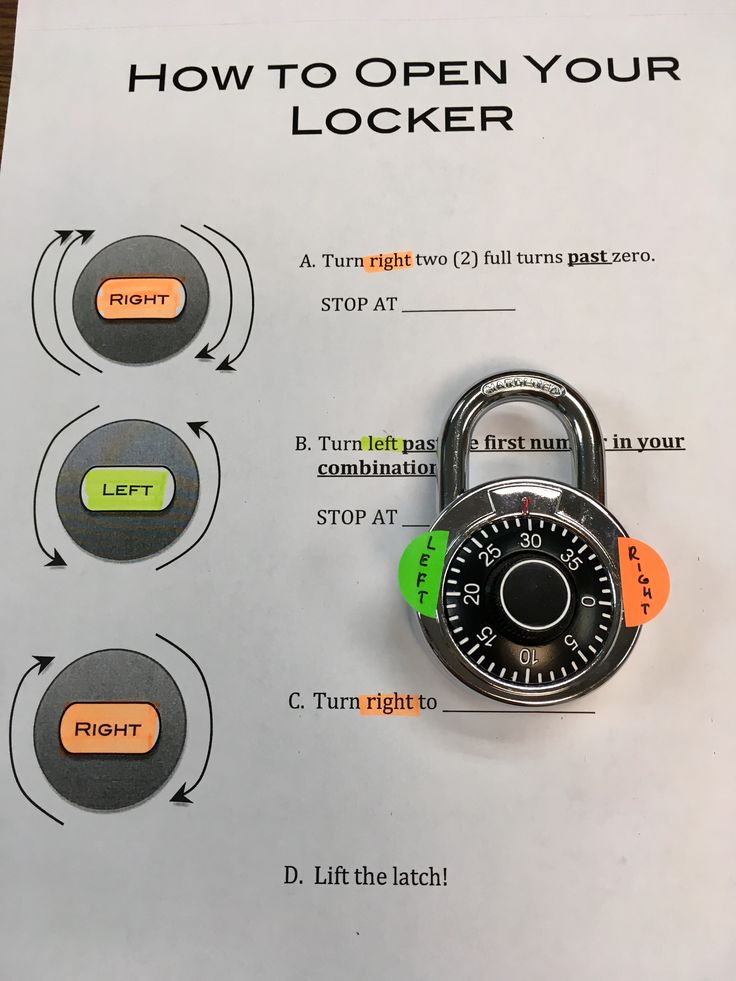

First, try to remember any personal information you might have used as your combination. It could be your birthday, your pet's name, or your favorite sports team's jersey number. If that fails, you might need to pick the lock.
Manual Picking
Picking a combination lock requires patience and a basic understanding of how they work. You'll need a small tool, like a paperclip or a thin piece of wire. Straighten the tool, insert it into the bottom hole of the lock, and feel for the notches that correspond to the numbers on the lock.


Once you've found a notch, turn the dial clockwise and then counterclockwise, listening for the lock to click into place. This indicates you've found a correct number in your combination. Repeat this process until you've found all the numbers in your combination.
Using a Lock Picking Tool
If you're serious about lock picking, consider investing in a lock picking tool designed for combination locks. These tools have a small hook at the end that can help you feel for the notches more easily.
Using a lock picking tool is similar to using a makeshift tool like a paperclip. Insert the tool into the lock, feel for the notches, and turn the dial to find the correct combination. With practice, you can unlock a combination lock in just a few seconds.


Key Locks
Key locks are less common in schools but can be found in some locker rooms or storage areas. If you've misplaced your key, you'll need to contact your school's maintenance department or a locksmith to have the lock replaced or the key duplicated.
If you have your key but it's not working, check for any obstructions in the lock. Dirt and debris can prevent the lock from turning. Try cleaning the lock with a small brush and some compressed air.
Lock Lubrication
If your key is turning but the lock is stiff, it might need lubrication. Use a small amount of graphite powder or WD-40 to lubricate the lock. Insert the key and turn it back and forth a few times to work the lubricant into the lock.


Be careful not to use too much lubricant, as this can attract dirt and debris, making the lock worse. Also, avoid using oil-based lubricants, as they can attract dirt and cause the lock to seize up.
Rekeying the Lock
If your key is still not working after cleaning and lubricating the lock, the lock may need to be rekeyed. This involves replacing the internal mechanism of the lock so that a new key can be used. This is a job for a professional locksmith.
Before you call a locksmith, make sure you have permission from your school to have the lock rekeyed. Some schools may have a policy against rekeying locks without approval.
Digital Locks
Digital locks are becoming more common in schools due to their convenience and security. They use an electronic keypad to enter a combination, which can be changed as needed. If you've forgotten your combination, you'll need to reset the lock.
Resetting a digital lock typically involves pressing a series of buttons in a specific sequence. Consult your lock's manual for the exact steps. If you've misplaced the manual, you can often find the instructions online by searching for your lock's make and model.
Using the Master Code
If you've forgotten your combination and can't reset the lock, you may be able to use a master code to unlock it. A master code is a universal code that can be used to unlock any digital lock made by the same manufacturer.
Master codes are typically printed on the back of the lock or in the lock's manual. If you can't find the master code, contact the lock's manufacturer for assistance. Once you've unlocked the lock using the master code, you can change the combination to something you'll remember.
Replacing the Lock
If your digital lock is broken or beyond repair, it will need to be replaced. This is a job for a professional locksmith. Make sure you have permission from your school before replacing the lock.
When choosing a new digital lock, consider one that is easy to use and program, and has a good reputation for reliability and security. Also, make sure the lock is compatible with your school's existing lock system.
And there you have it! With these tips, you should be able to unlock any school locker lock with ease. Just remember, always respect the privacy and property of others, and never attempt to unlock a locker that isn't yours without permission. Happy unlocking!
Related Articles
School Locker Lock Instructions: Step-by-Step Guide
Learning how to use a school locker lock correctly can save you time and stress during a busy day. These sturdy metal storage units line the hallways of most...
How to Open Old School Locker Lock Easy Guide
Ever found yourself in a nostalgic trip down memory lane, only to be thwarted by an old school locker lock that's seen better days? You're not alone. These...
School Locker Lock How To Open Easy Step By Step Guide
Ever found yourself standing in front of your school locker, staring at the lock, and drawing a blank on how to open it? You're not alone. School locker locks...
How to Use an Old School Locker Lock: Easy Step by Step Guide
Ever found yourself in a nostalgic daze, reminiscing about the good old days when school lockers were the ultimate symbol of personal space? If you're here...

Find School Locker Locations Brisbane Fast Easy Guide
Finding the perfect school locker location in Brisbane can make a significant difference to your daily school routine. Not only does it help you stay...

Easy DIY Clock for School Project: Step-by-Step Guide
Creating a clock for school project is an excellent way to combine creativity with basic engineering principles, turning a simple assignment into a memorable...